


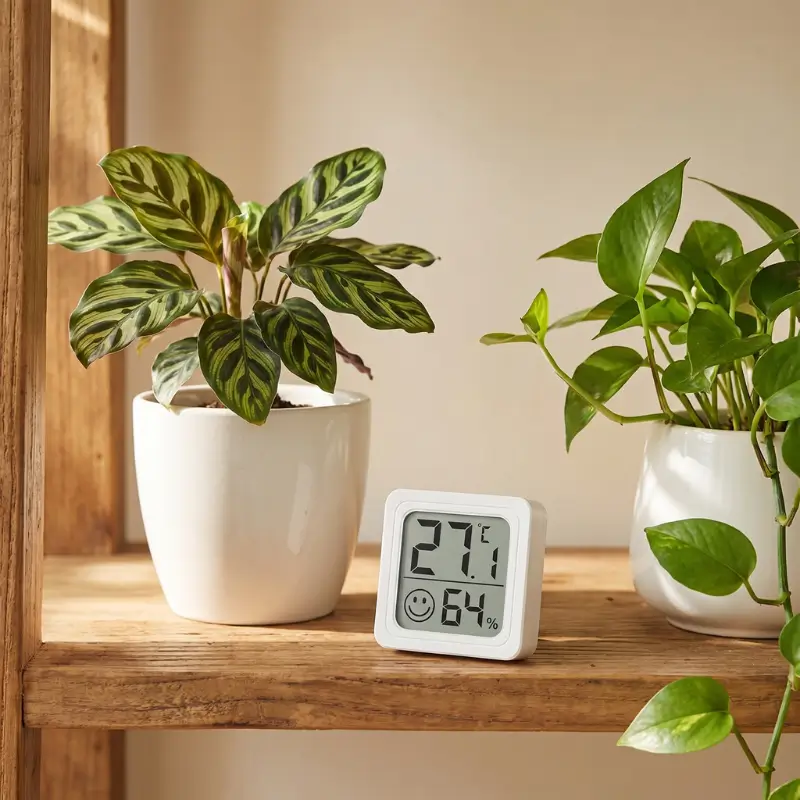


Mini Indoor Thermometer & Hygrometer for Plants — LCD Display, Battery Included
Original price was: රු1,297.00.රු997.00Current price is: රු997.00.
A palm-sized LCD thermometer and hygrometer built specifically for plant parents. At just 4.4 × 4.4 cm — roughly the size of an egg — it fits anywhere: on a shelf next to your Calathea, stuck to the inside of a propagation box, or mounted beside your grow light setup.
Know your plant’s environment at a glance
Plants don’t just need water and light — they need the right temperature and humidity to thrive. Too dry, and tropical plants drop leaves, brown at the tips, and struggle with pests. Too hot, and growth stalls. Most plant problems that look like a watering issue are actually an environment issue — and this meter helps you see that clearly.
This mini thermometer and hygrometer gives you two critical readings simultaneously: ambient temperature and relative humidity. The large LCD digits are readable at a glance. The smiley comfort indicator gives you an immediate signal when conditions fall outside the comfortable range, without needing to remember target numbers.
What’s included
- Mini LCD thermometer hygrometer (4.4 × 4.4 cm / 1.73 × 1.73 inch)
- LR1130 button cell battery — pre-installed and ready to use immediately
- Adhesive tape disc — for mounting to walls, shelves, or propagation lids
- Removable bracket — for freestanding tabletop or shelf use
What each part of the display means
- Top half — Temperature: Shows the current ambient temperature in large bold digits. The small °C or °F symbol indicates which unit is active. To switch units, press and hold the button on the back of the unit for 3 seconds.
- Bottom half — Humidity + comfort indicator: Shows relative humidity as a percentage (e.g. 59%). The small smiley face to the left is the comfort indicator — it changes expression based on whether conditions are within a comfortable range.
Understanding the smiley comfort indicator
Happy face
Conditions are within a comfortable range. For most tropical plants, this means humidity is between approximately 40–70% RH and temperature is moderate.
Sad / neutral face
Conditions are outside the comfortable range — either too dry, too humid, too hot, or too cold. Check which reading is out of range and adjust accordingly.
Switching between °C and °F
Press and hold the small button on the rear of the unit for approximately 3 seconds until the display switches units. The meter retains your selected unit even after battery replacement.
Using this meter to care for your plants
Temperature and humidity are the two most frequently overlooked variables in plant care. This guide helps you use the meter's readings to take practical action — not just observe numbers.
Target ranges by plant type
Calathea, Philodendron, Pothos, Peace Lily
- Humidity: 50–70% RH
- Temperature: 18–30°C (64–86°F)
- Comfort indicator should show happy face
Echeveria, Haworthia, Aloe, most cacti
- Humidity: 10–40% RH
- Temperature: 15–32°C (59–90°F)
- A sad face at low humidity is fine for these plants
Boston Fern, Maidenhair, Nerve Plant, Orchids
- Humidity: 60–80% RH
- Temperature: 16–27°C (61–81°F)
- Use near a humidifier or pebble tray
Cuttings in domes, seed trays, propagation boxes
- Humidity: 70–90% RH
- Temperature: 20–28°C (68–83°F)
- Stick the meter inside the propagation dome to monitor
What to do when readings are off
- Humidity too low (below 40% for tropicals): Group plants together, place a water-filled pebble tray nearby, or use a small humidifier. Avoid misting — it raises humidity only briefly and inconsistently.
- Humidity too high (above 80% for most plants): Improve airflow. Move the plant away from enclosed spaces, reduce humidifier output. High humidity with low airflow encourages fungal issues.
- Temperature too low (below 15°C / 59°F): Move the plant away from cold windows and draughts. Most tropical plants suffer below 15°C and stop growing below 10°C.
- Temperature too high (above 30°C / 86°F): Increase airflow, shade the plant from direct sun, or move away from radiators and heat sources. Watch for drooping and wilting as early stress signals.
Setup — ready in seconds
- Remove the battery pull-tab (if present) from the back of the unit. The LR1130 battery is pre-installed — the meter should power on immediately and display readings within 30 seconds.
- Choose your mounting method: Slot the unit into the removable bracket for freestanding use on a shelf or desk, or use the included adhesive disc to mount it directly to a surface — a wall, the side of a bookshelf, a propagation box lid, or a grow light pole.
- Position it correctly (see placement guide below) and allow 1–2 minutes for readings to stabilise.
- Set your preferred unit. The meter defaults to °C. To switch to °F, press and hold the rear button for approximately 3 seconds until the display changes.
Placement guide — where to put it
- Next to the plant, at canopy level. This is the most useful position — it reads the air your plant is actually living in, not the air a metre away at head height.
- Away from direct sunlight. Sunlight hitting the sensor directly will cause artificially high temperature readings. Position it in the ambient air, not in a sunbeam.
- Away from vents, radiators, and fans. Any direct heat or cold airflow source will skew readings. The goal is ambient air temperature and humidity, not the output of an appliance.
- Inside propagation domes and boxes. The adhesive mount makes this easy — stick it to the inside of the lid for continuous monitoring without opening the dome.
- One per microclimate. A windowsill and a shadowed corner of the same room will produce meaningfully different readings. If you care about accuracy for specific plants, place a meter near each distinct growing spot.
AgrilHoTech warranty coverage
Display & sensor malfunction — 6 months
If the LCD display fails to power on, shows a blank or corrupted reading, or the sensor produces clearly erroneous readings under normal indoor use within 6 months of purchase, we will replace the unit. This covers manufacturing defects only.
Physical damage & misuse
Cracked display, water damage, battery corrosion, damage from outdoor exposure, or readings that appear inaccurate due to incorrect placement (near heat sources, in direct sunlight, in draughts) are not covered. Please review the placement guide before submitting a claim.
How to make a warranty claim
- Contact AgrilHoTech support at [your support email or contact page link].
- Include your order number and a brief description of the issue.
- Attach a photo or short video showing the problem clearly.
- We will respond within 2 business days and arrange a replacement if the claim is valid.
How accurate are the readings?
Temperature accuracy is ±1°C (±1.8°F) with a resolution of 0.1°C (0.2°F) — meaning it can detect changes as small as a tenth of a degree. Humidity accuracy is ±5% RH with a resolution of 1% RH. These are solid specifications for a budget-friendly meter and are sufficient for all practical plant care decisions.
Can I switch between Celsius and Fahrenheit?
Yes. Press and hold the small button on the rear of the unit for approximately 3 seconds to toggle between °C and °F. The selected unit is retained until you switch again — including after battery replacement.
How long does the battery last?
Estimated battery life with the included LR1130 cell is approximately 12 months under normal continuous use. Battery life will vary depending on temperature — very cold environments drain batteries faster. Replacement LR1130 cells are widely available at electronics or hardware stores.
Can I use it inside a propagation dome or terrarium?
Yes — this is one of the most practical uses for this meter. The adhesive disc allows you to mount it inside a propagation dome lid, a terrarium panel, or any enclosed growing environment. Ensure the sensor is not in direct contact with condensation droplets, as sustained moisture on the sensor face can temporarily affect readings.
The reading seems higher than expected — is it broken?
Not necessarily. The most common cause of unexpectedly high temperature readings is placement near a direct heat source — sunlight hitting the meter directly, proximity to a radiator or grow light, or an enclosed space that traps warmth. Move the meter to open ambient air, away from direct light and heat, and allow 2–3 minutes to stabilise before assessing accuracy.
What does the smiley face indicator mean exactly?
The comfort indicator is a general-purpose visual cue based on a combined assessment of temperature and humidity. A happy face indicates conditions within a generally comfortable indoor range. A neutral or sad face signals that one or both readings are outside that range. For plant care, use the actual numeric readings alongside your plant's specific preferred range — the smiley is a quick check, not a substitute for reading the numbers.
Is the adhesive mounting permanent?
The included adhesive disc provides a secure hold on most smooth surfaces. Removal may leave a small adhesive residue depending on the surface type. For a non-permanent option, use the removable bracket on its own without the adhesive, which allows the meter to stand freely and be repositioned at any time.
Can I use this in a bathroom, kitchen, or laundry room?
The meter can handle high-humidity environments (reading range up to 99% RH) and will function in bathrooms and kitchens. However, it is not waterproof — avoid direct water splashing on the unit, steam directed at the sensor, or condensation building up on the display. Use the bracket mount rather than adhesive if the surface experiences temperature swings that could affect adhesion.
Only logged in customers who have purchased this product may leave a review.
Related products
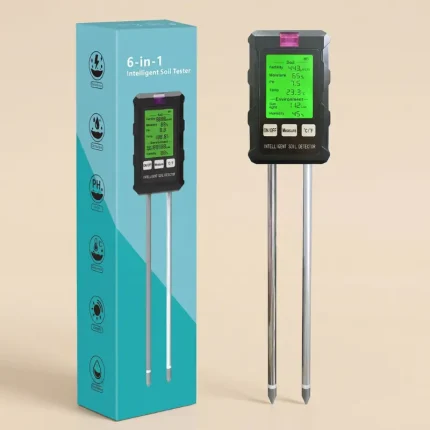
6-in-1 Intelligent Soil & Environment Detector — pH, EC Fertility, Moisture, Temperature, Sunlight & Air Humidity with Backlit LCD Display
A digital 6-in-1 soil and environment meter that reads six parameters simultaneously from a single insertion: soil electrical conductivity (EC/fertility), moisture level, pH, temperature, ambient light intensity (LUX), and air humidity. All six values appear at once on a backlit green LCD screen, so you can assess your plant's growing conditions in under 10 seconds without switching modes or swapping probes.
pH range 3.5–9.0 pH (resolution 0.1 pH); moisture 0–99%; EC fertility 0–1999 μS/cm; temperature in °C or °F; sunlight 0–13,500+ LUX; air humidity 0–99%. Powered by 2× AAA 1.5V batteries. Foldable rotatable screen.
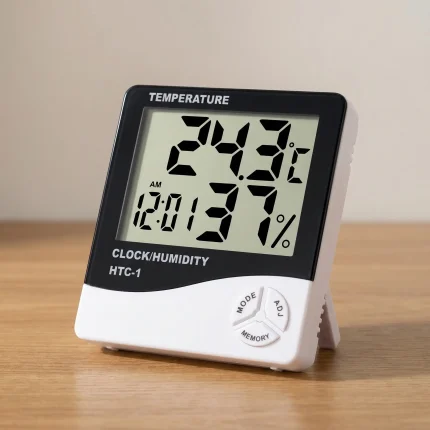
HTC-1 Digital Hygrometer & Thermometer — Indoor Humidity Monitor
Struggling with crispy leaf edges? A reliable indoor humidity monitor is the only way to know for sure if your tropical plants are getting the moisture they need. The HTC-1 takes the guesswork out of your daily plant care by showing you exactly what is happening in your room's microclimate.
Most plant problems trace back to environmental stress — usually cold drafts or dry air that you can't feel, but your plants definitely do. This compact unit displays the current temperature, relative humidity, and the time, all at a glance. We even include a fresh AAA battery so you can start tracking your grow space the second you open the box.
- Track highs and lows: Built-in memory records the maximum and minimum temperature and humidity over 24 hours.
- Fast reads: Sensor updates quickly, giving you an accurate picture of your room's conditions.
- Ready to use: Comes complete with a high-quality AAA battery and built-in kickstand.
 Shop All HousePlants
Reviews
Clear filtersThere are no reviews yet.