




2-in-1 Handheld Digital Plant Microscope (1080p HD)
Original price was: රු7,999.00.රු6,999.00Current price is: රු6,999.00.
Most indoor plant problems are misdiagnosed for one simple reason: you can’t fight what you can’t see. Early-stage spider mites just look like household dust, and juvenile thrips are often mistaken for minor mechanical damage until the infestation takes over.
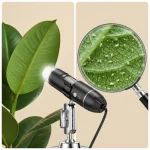
This 1080p digital microscope takes the guesswork out of plant care. With up to 1000x physical magnification and a built-in 8-LED ring light, it connects directly to your phone or laptop. You can clearly inspect leaf tissue, spot microscopic pests, and check root health before deciding on a treatment plan. Because holding a camera steady at 1000x is nearly impossible, we include a heavy 360° metal bracket to keep your focus perfectly sharp.
Phone & PC Ready
2-in-1 cable connects directly to USB-C laptops, Androids, and Lightning iOS devices.
Stop Guessing
Identify exactly which pest or fungus you are dealing with to apply the right treatment.
Diagnose Plant Issues with 1000X Precision
When a leaf starts yellowing or drooping, the cause could be overwatering, nutrient lock-out, or a microscopic pest. Treating the wrong cause usually makes the problem worse. This handheld digital microscope gives you a clear, high-definition view of what’s actually happening on the surface of your plant.
See the Unseen
The 2-megapixel sensor delivers a 1920×1440 resolution feed straight to your screen. Catch spider mite webbing, thrips larvae, and fungal spores weeks before they become a visible, plant-killing problem.
8-LED Ring Light
Micro-photography requires intense light. The built-in 8 LEDs are controlled via an inline dimmer wheel on the cable, letting you reduce glare on shiny leaves or brighten up dark root nodes.
No Wi-Fi Headaches
Unlike wireless models that suffer from lag and drop-outs, this runs via a direct wired connection. The 2-in-1 cable supports USB-C (Android/Modern Laptops) and Lightning (older iOS).
Quick Snap Button
Found a pest? Press the physical ‘SNAP’ button on the side of the microscope barrel to take an instant photo to reference later or show your local nursery.
Common Indoor Plant Uses
- Pest Identification: Confirm if that white speck is just perlite dust or a moving mealybug crawler.
- Tissue Health: Inspect the edges of brown spots to determine if it is a fungal infection (spores visible) or underwatering (dry cell walls).
- Root Checking: Look closely at aerial roots or propagation cuttings for early signs of healthy callusing vs. bacterial rot.
Setting Up Your Plant Microscope
Getting a clear image requires a little patience the first time you set it up. Follow these steps to get a stable, focused view of your leaves.
- Mount the Microscope: Slide the black barrel into the metal stand's holding ring. Tighten the side screws so it is secure. Place the stand on a flat, stable table.
- Connect to Your Device:
- For iOS & Android: Download the free Inskam App from your app store. Plug the cable into your phone. Open the app and grant camera permissions.
- For Mac: Plug into a USB-C port, open the native 'Photo Booth' or 'QuickTime' app, and select the microscope from your camera drop-down list.
- For Windows: Plug into a USB-C port, open the native 'Camera' app, and switch the camera input.
- Position the Leaf: Place the affected leaf or cutting flat on the base of the metal stand, directly under the lens.
- Dial in the Light: Turn the inline wheel on the cable to turn on the LEDs. Adjust brightness to avoid washing out the image—shiny leaves reflect a lot of light.
- Focus the Lens: Slowly turn the large silver focusing tube on the microscope body. Stop when the image is sharp. Use the metal stand's joints to move closer or further away to change the magnification scale (50x up to 1000x).
Frequently Asked Questions
Does this work with my specific phone?
If you have an iPhone running iOS 10 or later (with a Lightning or USB-C port), or an Android running version 6.0 or later with a USB-C port, it will work. Android users simply need to ensure "OTG" (On-The-Go) is enabled in their phone settings so the port can receive data.
Can I use it free-hand without the metal stand?
You can, but we don't recommend it for plant diagnostics. When you are zoomed in at 500x or 1000x, natural hand tremors make it nearly impossible to keep a tiny thrip in focus. The metal stand is essential for getting clear, usable photos of what is damaging your plants.
Is the microscope waterproof?
No. Keep the device away from misting bottles, humidifiers, and wet soil. If you need to inspect damp roots or freshly watered soil, place a small sample on a dry piece of paper towel before putting it under the lens.
Why is the image glaring or washed out?
Many tropical plants (like Monsteras or Philodendrons) have waxy, reflective cuticles. If the LEDs are turned up to maximum, the light will bounce right back into the lens. Use the inline dial on the cable to dim the LEDs until the glare disappears and the leaf texture becomes visible.
Can I record videos of pests moving?
Yes. The companion app (Inskam) allows you to record MP4 video directly to your phone. This is incredibly helpful if you want to post the footage to a plant forum to ask for a second opinion on pest identification.
Technical Specifications
| Camera Sensor | 2 Megapixels (HD) |
| Magnification Range | 50X to 1000X (Physical Manual Focus) |
| Photo / Video Resolution | 1920 x 1440P |
| Focal Distance | Manual focus (0–90mm) |
| Illumination | 8 Adjustable LEDs (Inline dial control) |
| File Formats | JPG (Photos) / MP4 (Video) |
| Connector Type | 2-in-1 Cable: USB-C and Apple Lightning |
| Cable Length | 1.5 Meters |
| System Compatibility | iOS 10.0+, Android 6.0+ (requires OTG), Windows, macOS |
| Mobile App | Inskam (Available on App Store & Google Play) |
| Stand Material | Heavyweight Metal Alloy (360° articulation) |
Our Guarantee
Electronic tools used around plants need to be reliable. We stand behind the quality of this diagnostic tool.
- 6-Month Hardware Warranty: Covers any manufacturing defects, LED failures, or internal sensor faults.
- App Support: If you struggle to get the microscope to connect to your specific device, reach out to us and we will walk you through the OTG or permission settings.
Note: This warranty does not cover water damage or physical drops. Always keep the microscope away from active humidifiers and watering cans.
For warranty claims and support, contact us via WhatsApp: +94761858150.
Only logged in customers who have purchased this product may leave a review.
Frequently bought together

2-in-1 Handheld Digital Plant Microscope (1080p HD)
Most indoor plant problems are misdiagnosed for one simple reason: you can't fight what you can't see. Early-stage spider mites just look like household dust, and juvenile thrips are often mistaken for minor mechanical damage until the infestation takes over.
This 1080p digital microscope takes the guesswork out of plant care. With up to 1000x physical magnification and a built-in 8-LED ring light, it connects directly to your phone or laptop. You can clearly inspect leaf tissue, spot microscopic pests, and check root health before deciding on a treatment plan. Because holding a camera steady at 1000x is nearly impossible, we include a heavy 360° metal bracket to keep your focus perfectly sharp.
2-in-1 cable connects directly to USB-C laptops, Androids, and Lightning iOS devices.
Identify exactly which pest or fungus you are dealing with to apply the right treatment.
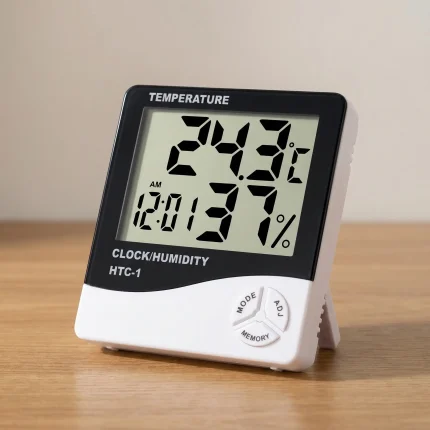
HTC-1 Digital Hygrometer & Thermometer — Indoor Humidity Monitor
Struggling with crispy leaf edges? A reliable indoor humidity monitor is the only way to know for sure if your tropical plants are getting the moisture they need. The HTC-1 takes the guesswork out of your daily plant care by showing you exactly what is happening in your room's microclimate.
Most plant problems trace back to environmental stress — usually cold drafts or dry air that you can't feel, but your plants definitely do. This compact unit displays the current temperature, relative humidity, and the time, all at a glance. We even include a fresh AAA battery so you can start tracking your grow space the second you open the box.
- Track highs and lows: Built-in memory records the maximum and minimum temperature and humidity over 24 hours.
- Fast reads: Sensor updates quickly, giving you an accurate picture of your room's conditions.
- Ready to use: Comes complete with a high-quality AAA battery and built-in kickstand.

Digital Nutrients Weighing Spoon — 50g/0.1g Scale Measuring Spoon
Stop guessing with your dry fertilizers. This Digital Weighing Spoon measures your nutrient salts, pH buffers, and organic amendments with precise 0.1g accuracy, helping you avoid accidental nutrient burn.
Built for practical, everyday plant care. It features a detachable scoop that easily slides off for safe washing, keeping the digital handle completely dry. Whether you are mixing a small batch of hydroponic nutrients or measuring out mycorrhizae for a new repot, it gives you exactly what you need without the mess of a standard flat scale.
 Shop All HousePlants
Reviews
Clear filtersThere are no reviews yet.